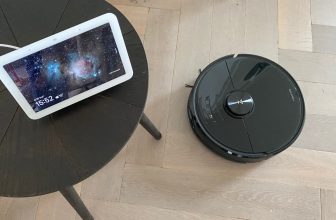
More and more iRobot Roomba robot vacuum cleaners can empty themselves. Once at the charging station, the contents of the dust container are emptied. The dirt is then collected in a bag in the charging station. This bag will eventually fill up. In that case you will need to empty the station and install a new Roomba bag.
How do you empty the Roomba Clean Base?
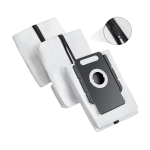
To empty the charging station, you can follow the following steps:
- Open the cover on the top of the Roomba Base Station
- Slide the Roomba bag up and out of the station
- The bag is made in such a way that it closes automatically
- Place the bag in the trash
- Click a new Roomba bag into the charging station
- Close the top cover again
In the video below I show you step by step how this works:
Why does the Roomba Clean Base come with a bag?
It would be interesting to give a little more information about why there is actually a bag in the charging station. A vacuum cleaner bag works partly as a filter: a bag is actually somewhat comparable to a HEPA filter. Very small particles – such as pollen and allergens – are filtered out of the air by the vacuum cleaner bag, after which the clean air leaves the charging station.
If there were no vacuum cleaner bag in the charging station, there would be an enormous dust emission: contaminated particles are spread again when the Roomba robot vacuum cleaner is emptied, so that the robot vacuum cleaner can actually start all over again.
With every Roomba that empties automatically, you receive several vacuum cleaner bags. I also saw this during the iRobot Roomba J7+ review, where I discovered two extra pockets.

Can I reuse the Roomba robot vacuum cleaner bag?
“Can't I just reuse the Roomba bag?” is a comment I often hear. Unfortunately, this is not the case with the standard Roomba bags. I recently wrote an extensive guide to reusable Roomba bags. These are for sale, but are not from iRobot itself.
The reusable Roomba bags have a zipper. When the bags are full, you can unzip them above the trash can and reinstall them in the charging station afterwards.
When to replace the Roomba bag with a new one?
An LED light can be found on the charging station of a Roomba robot vacuum cleaner. In many cases it is placed in the middle of the charging station, just above the robot vacuum cleaner.

In addition to an indicator light, you can also receive a notification in the Roomba app. The Roomba can also flash a red light, which in many cases is accompanied by a Roomba error code.
I hope my guide to emptying the Roomba Clean Base helped. Do you have additional questions? Leave a comment below this page!